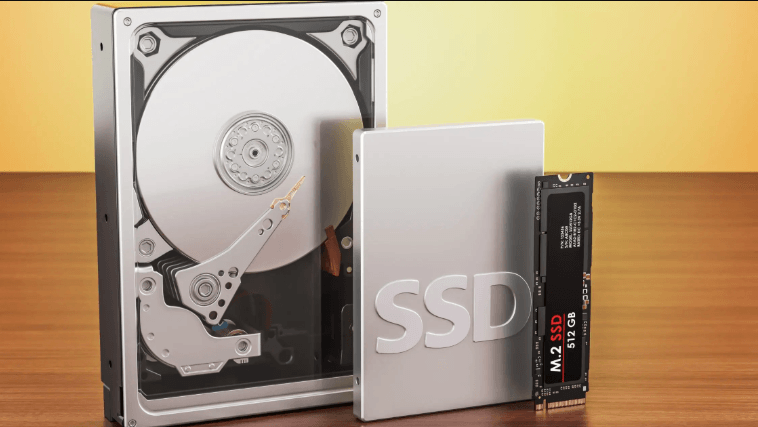
HDDs, SSDs, and NVMe represent a progression in storage technology, each with distinct trade-offs. HDDs offer high capacity and low cost but slower access times; SSDs improve speed and reliability with flash memory; NVMe drives maximize throughput by using PCIe lanes for ultra-low latency. The choice hinges on use case and budget. As workloads evolve, the practical implications become clearer, yet the optimal path remains nuanced, inviting closer scrutiny of performance needs and long-term costs.
Which Storage Type Should You Use for Gaming, Work, and Everyday Use
When choosing storage types for gaming, work, and everyday use, the decision hinges on three core factors: performance, capacity, and cost. The discussion highlights data durability and power consumption as practical constraints.
For gamers, prioritize faster access and lower latency; for work, balance reliability with capacity; for general use, cost efficiency and stable durability guide selections.
How Data Is Stored and Accessed: HDDs, SSDs, and NVMe in Plain Language
Hard drives, solid-state drives, and NVMe drives store and retrieve data using fundamentally different technologies, yet all serve the same purpose: to hold digital information and provide access to it.
Data is organized differently: magnetic sectors, flash cells, and PCIe lanes govern access.
Data durability varies with medium, while wear leveling extends flash lifespan by distributing writes across cells.
Performance and Responsiveness: Speed, Latency, and Real-World Benefits
Speed and latency differences among HDDs, SSDs, and NVMe drives determine how quickly data can be located and delivered to the system, shaping overall responsiveness under varied workloads.
The comparison highlights speed benchmarks across interfaces and the tangible effects on multitasking and boot times.
Latency improvements translate to snappier application launches, smoother streaming, and more predictable performance under sustained I/O, empowering freedom seekers.
Buying Guide: Choosing HDD, SSD, or NVMe Based on Budget and Use Case
Determining the right storage involves aligning budget with real-world needs, as HDDs, SSDs, and NVMe drives offer distinct value in capacity, performance, and cost per gigabyte. A practical choice matches storage capacity to use case: archival, media, or OS/app workloads.
Consider power consumption, reliability, and upgrade paths, balancing long-term efficiency with upfront affordability for freedom-loving users.
Frequently Asked Questions
How Do Wear Leveling and TRIM Affect SSD Longevity?
Wear leveling distributes writes evenly, delaying wear in every block, while trim effects help the controller reclaim unused space, reducing unnecessary writes. Together, they extend SSD longevity by minimizing write amplification and maintaining consistent performance over time.
Can NVME Drives Fail Faster Under Heavy Multitasking?
Yes, NVMe endurance can be challenged by heavy multitasking, though modern controllers mitigate transfers. The multitasking impact depends on workload type; sustained parallel I/O may elevate wear, while caching and underrun protection help balance lifespan expectations.
Do Drives Need Heat Sinks for Sustained NVME Performance?
Temperature management influences sustained NVMe performance, though most drives handle heat via internal throttling; heat sinks are beneficial for long, heavy workloads. The focus remains on power efficiency and avoiding thermal throttling impacts on throughput.
See also: flashingtech
Is RAID Beneficial for Consumer Hdd/Ssd Setups?
RAID benefits exist for redundancy and performance, but Consumer RAID drawbacks include complexity, cost, and marginal gains without proper workloads. In general, RAID benefits justify adoption for critical data, while casual setups may be better served by backups.
How Does Caching Impact Real-World for Gaming Vs Editing?
In gaming cache vs streaming cache, the impact is modest for frame rates but meaningful for load consistency; editing RAM cache boosts responsiveness and smooth scrubbing, yet real gains depend on workload, RAM speed, and storage tiering.
Conclusion
A balanced storage strategy tailors speed to need: HDDs for bulk, SSDs for everyday responsiveness, and NVMe for peak workloads. In real-world terms, users typically notice a 1–2 second OS boot reduction and snappier app launches when moving from HDDs to SSDs, with NVMe offering further gains in heavy tasks like large file transfers and gaming load times. A striking stat: NVMe can deliver up to several gigabytes per second, orders of magnitude faster than traditional HDDs.